Free Setup Guide
Minecraft Custom Domain
Replace 123.45.67.89:25565 with a clean domain like play.yourserver.com. Click any card to jump to its guide.
Option 1
Dynu.com
Manual DNS. Works with any host.
FreeManual
Option 2
Shockbyte
One-form subdomain. Fastest setup.
FreeAuto
Option 3
Min3.online
Instant subdomain, Discord login.
FreeDiscordInstant
Option 4
Elixernode
Built-in panel domain manager.
FreeAuto
| Feature | Dynu | Shockbyte | Min3.online | Elixernode |
|---|---|---|---|---|
| Any hosting provider | ✓ Yes | Shockbyte only | ✓ Yes | Elixernode only |
| No account needed | Account req. | ✓ Yes | Discord login | Account req. |
| Use your own domain | ✓ Yes | Subdomains only | Subdomains only | Subdomains only |
| Full DNS control | ✓ Yes | Auto only | Auto only | Auto only |
| Setup time | ~10 min | ~2 min | ~1 min | ~3 min |
1 Dynu.com — Manual DNS
Best if you use a custom host or want full DNS control. The free plan is all you need.
Create your account
- Go to dynu.com → Create Account, fill in your details and verify your email.
- Log in to the Control Panel.
Add a hostname
- Left menu: DDNS Services → Add DDNS.
-
Choose one:Use Dynu's domain — type a hostname (e.g.
myserver), pick a free TLD likeaccesscam.org. Result:myserver.accesscam.org
Use your own domain — enter your domain (e.g.mydomain.com). - Click Add.
Clear the IPv4 field
- Delete any value in the IPv4 address field and leave it blank. Click Save.
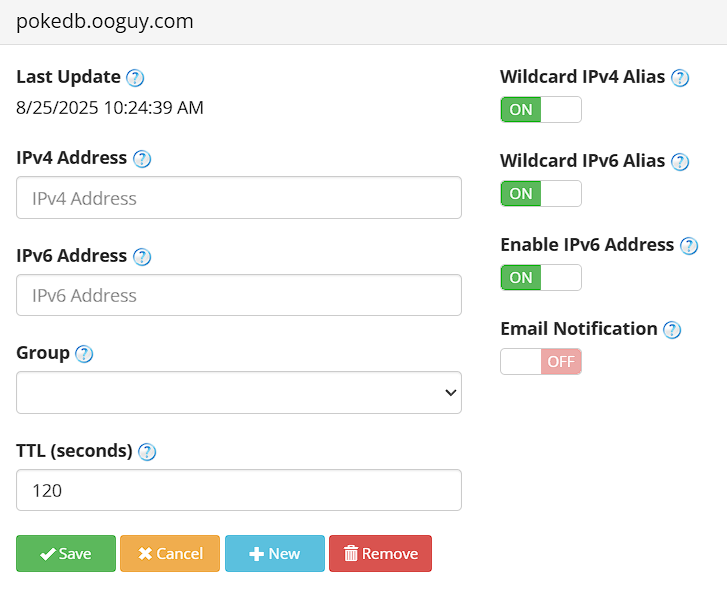
Leave IPv4 blank — you'll point the domain via an A record instead.
Create an A record
- Open DNS Records for your domain → click Add → select type A.
-
Set Points To to your server's IP:
click to copyEternal Hosting — Canada : 51.79.96.45
Eternal Hosting — Finland: 37.27.49.121
Other hosts: find your IP at nslookup.io. - Leave Host blank (or
@). Set TTL to60. Click Save.
Create an SRV record
- Click Add → select type SRV.
-
Fill in:
Field Value Note Node Name _minecraft._tcpUnderscore before both words Priority 0Weight 5Port 25565Change if needed Target myserver.accesscam.orgYour domain from the A record TTL 120 - Click Save.

Node Name must be exactly
_minecraft._tcp — underscore before both words.Connect
click to copymyserver.accesscam.org
Note: DNS usually propagates in minutes but can take up to 24 hours. Test at nslookup.io before sharing.
2 Shockbyte — Subdomain Creator
Fill one form and all DNS records are created automatically — no account or manual DNS needed.
- Open the Shockbyte Subdomain Creator.
-
Fill in the form:
Field What to enter Email Your email address Service Type MinecraftServer IP Your server's numeric IP Port 25565or your server's portServer Name e.g. myserverZone / Domain Pick any, e.g. .mc-game.xyzIP quick ref: Eternal Canada →51.79.96.45· Eternal Finland →37.27.49.121· Other hosts → nslookup.io - Solve the CAPTCHA → click Create.
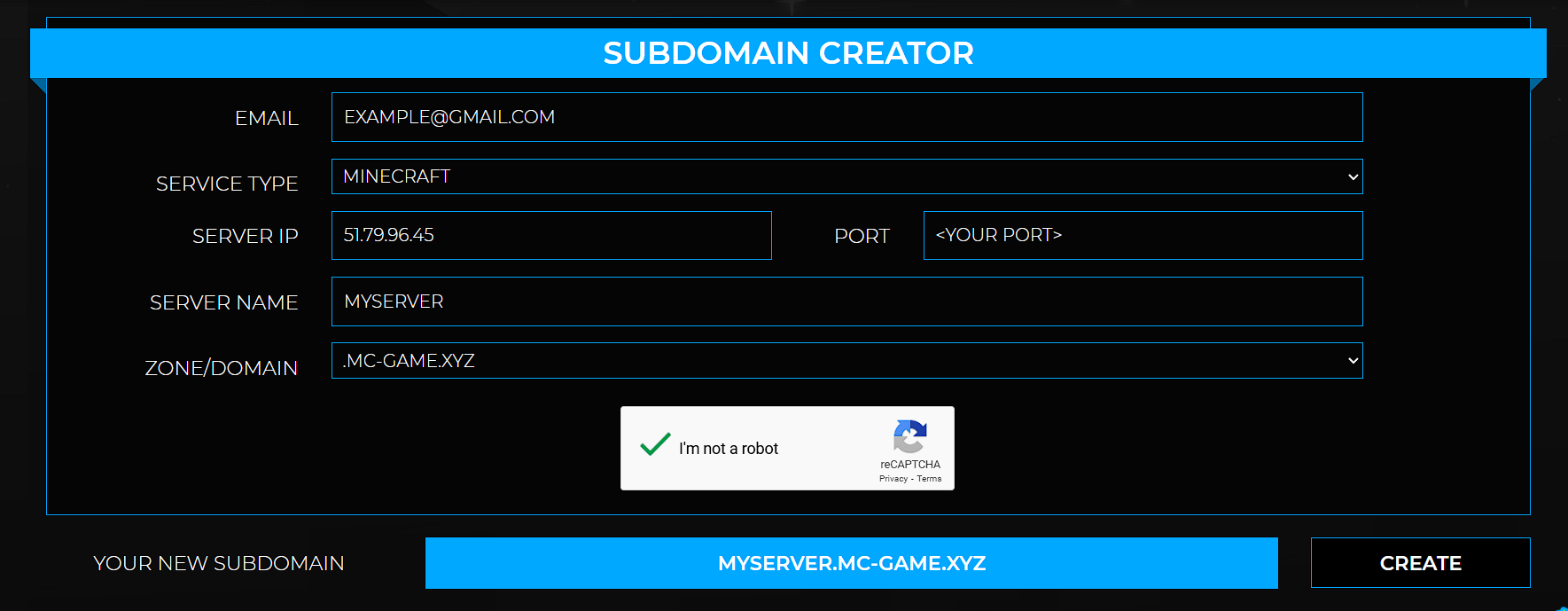
A and SRV records are created automatically.
Connect
click to copymyserver.mc-game.xyz
Note: Usually active within minutes. Port forwarding is handled automatically.
3 Min3.online — Instant Subdomain
Quickest option overall. Log in with Discord, add your server, get a live subdomain under .min3.online in about a minute. Works with any host.
- Go to min3.online → click Log in → Login with Discord.
- Authorize the app when Discord prompts you.
- In the dashboard, click Add Server.
- Enter your server's IP and port — e.g.
51.79.96.45port25565. - Choose your subdomain name (e.g.
myserver). Final address:myserver.min3.online. - Save — live immediately.
Tip: If the UI changed or you're stuck, check discord.min3.online — setup instructions are pinned there.
Connect
click to copymyserver.min3.online
Note: Min3.online is a community project (hosted by PrumaHost.fr). If it goes down, Dynu is the best fallback since you own those records.
4 Elixernode — Panel Domain Manager
Only if you're hosted on Elixernode. Custom subdomains are managed directly in their panel — no external tools needed.
- Log in to your Elixernode panel.
- Select your Minecraft server.
- Go to Network → Custom Domain (or Subdomains depending on your plan).
- Enter your subdomain name and pick a domain from the dropdown.
- Click Create — A and SRV records are set up automatically.
Note: Elixernode's tool only works on their platform. If you switch hosts, use Dynu or Min3.online instead.
Connect
Use the subdomain shown in your Elixernode panel — no port needed.
Troubleshooting
Domain doesn't resolve at all ▶
Check your A record is pointing to the correct IP at nslookup.io. If it returns nothing or the wrong IP, fix your DNS record. Propagation can take up to 24 hours.
Connection timeout when joining ▶
DNS is resolving but the server isn't reachable. Confirm the server is running and listening on the correct port. If self-hosting, make sure port 25565 (TCP) is forwarded on your router.
Still need to type the port — SRV not working ▶
Check the Node Name is exactly
_minecraft._tcp — underscore before both words. Confirm the Target is your A-record domain name, not a raw IP. SRV records can take longer to propagate.IP works but domain doesn't ▶
Always a DNS issue. Run your domain through nslookup.io. If it resolves to the wrong IP or nothing, fix your A record. If it looks correct, wait — up to 24 hours.
Dynu IPv4 field — blank or filled? ▶
Leave it blank. The DDNS IPv4 field is for home servers with dynamic IPs that need auto-updating. Hosted servers have static IPs — you only need the A record in the DNS tab.
Contributors
PokeDB — Developed & designed
Alino10 — Ideas & support